Should I use a Business Page in Facebook to market my business?

Facebook Business Page

Facebook Business Page

Creating a Facebook page for your Business is the easy part!

But first you will want to know if your customers are actually on Facebook and have a plan on how you are going to get them to your page and eventually become customers. Yes, I know, everyone has told you that Social Media isn’t a sales tool and that it is just a place to build awareness, right? Well those are probably the people that aren’t getting anything out of their Facebook marketing.

Here’s the real scoop. If you are not producing customers for your business you are not marketing…you are simply wasting your time. Here are a few tips to build a business page in Facebook and actually market your business the right way.

  1. Your Customers must be on Facebook
    All to often businesses will start a Facebook Business Page because everyone told them they should. The only reason to start a Facebook Business Page is because your potential customers are on Facebook. That is it!
  2. Create a Plan to Market Your Business on Facebook
    Once you know your potential customers are on Facebook you will want to have a plan of what you are going to be doing. Just because you put up a business page in Facebook, doesn’t mean anyone is going to come to it, “Like” it, or interact with it. You have to market your page like you would your website. In your plan will cover, how often you will be posting, how you will get people to your page, and how you will eventually convert them into a customer.
  3. Commit the time and resources
    Once you have your plan, you will quickly find out that going on Facebook can be a huge time waster, but the payoff can be massive. Learn to set a certain amount of time to posting and interacting with your fans. This will be a long term project, just like organic search engine optimization it take time to see the benefits from it. Here is where so many people just abandon their Facebook Business Page after a few months, but not you!
  4.  Measure your progress
    In order to measure your Facebook Marketing efforts you will need to see your fan base grow, the number of “like”, shares and comment continue to grow ( this will keep your Facebook Edgerank up), your email subscribers increase and traffic to your website from Facebook specifically should be on the rise.


Ultimately, if you are posting valuable content, interacting with your Facebook Fans and have a plan to move them from fans to customers you have a winning marketing platform. Facebook Pages for Business is one of the best ways to find and stay connected with your potential customers, but be sure that your potential customers are there firsts.

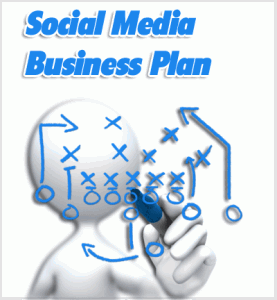
Creating a Social Media Business Plan

Creating a Social Media Business Plan

Lack of a Social Media Business Plan is the FASTEST Way to FAIL in Social Media!

Creating a Social Media Business Plan

When looking at social media as a way to grow your business you have to follow a few rule to make sure that you will be successful at leveraging your time and effort and provide an ROI.

Too many people don’t think that you can measure social media and therefore they don’t. Big Mistake.

  1. Start with the End in Mind
    What are you actually trying to achieve. More Fans, more visitors, more time on facebook, frustrating hours spent writing, arguing with follower? No probably not, if you are in business you want one of two things, to spread your message and/or to get more customers.
  2. Choose the right Social Media Sites
    Don’t look East hoping to see a sunset! The only reason you should be using one site over another is because your customers are there. Facebook is great for companies targeting a broad range of consumers, LinkedIn is perfect for businesses targeting other businesses. Pinterest has women who like fashion, fitness, cooking and lifestyle categories. If you don’t know where your target market is…survey your existing customer base to find out what sites they are on.
  3. Develop Your Social Media Business Plan
    Now that you have a clear idea of where you are going and what sites you are going to be on, you can finalize your social media plan. This will be a rough content calendar of what you are going to post about and when, this should have time constraints on the amount of time you will commit and spend there. It should also me a minimum amount of time that you will be spending there. Your plan should also have a clear funnel of how you are going to reach your target market, gain their attention, get them interested in learning more about you and your company and a way for them to take action. This could be getting on your email list, watching a video of you targeting their problems or interests with a call to action at the end… “For more information on… visit my website at www…” Here is where many people fail beyond trying too many things. They believe you can’t sell in social media so they don’t even give people enough information to move forward. People understand that you are not giving away everything for free and that you have more information on your website. Your website is the center of your marketing universe, move interested people in social media to you website, that is where leads live and die. Make sure they live on your site, get more information and become a lead for you.
  4. Commit, Stay Consistent & Persistent
    If you are not ready to move forward with your social media business plan…DON’T! You need the time and/or resources to post and interact in social media on a consistent and persistent basis. Dead social media profiles are surging everyday, businesses say social media doesn’t work…more likely because the business didn’t commit and have a clear understanding of where it was going and what it was going to take to get there.
  5. Measure Your Social Media Progress
    This more than just seeing how many fans, followers and comments you have. But understanding that if this is to drive business down the road, measure each part of the marketing funnel. From Fans to email subscribers to contact form requests, calls and ultimately sales. Without this part of measurement of the complete funnel your social media plan is destroyed.

Here are some additional resources to carve out your Social Media Business Plan:

  1. SocialMediaExaminer.com – 7 Tips for Creating a Social Media Plan for Your Business
    In this article Jim Belosic, the CEO of ShortStack, a self-service custom app design tool used to create Facebook apps for Facebook Pages, shares with us how to create a solid social media plan and why it is crucial to stay committed in social media.
  2. SBA.gov – How to Make a Social Media Plan for Your Business
    Here Tim Berry, Founder and Chairman of bplans.com, focuses his ideas on one social media outlet, Twitter. The key here again is to FOCUS your efforts, spreading your time over to many social media sites is a failure.
  3. Entrepreneur.com – 5 Fundamentals of a Social-Media Action Plan
    Also by Tim Berry – follows very much the advice in this article of having clear goals, taking consistent action, measuring progress, committing resources and following up.

WordPress Pinglist for 2014

Best WordPress Ping List

Using the best ping list will help expand your reach and drive new visitors to your site. But most people still don’t know about Pinging and how a ping list works.

Here is the Best Ping LisBest WordPress Ping Listt for 2014

http://rpc.pingomatic.com/
http://api.nrelate.com/rpcpinghost/
http://blogsearch.google.com/ping/RPC2
http://rpc.pingomatic.com/
http://blogsearch.google.com/ping/RPC2
http://ping.blo.gs/
http://ping.feedburner.com
http://ping.myblog.jp
http://rpc.blogbuzzmachine.com/RPC2
http://rpc.technorati.com/rpc/ping
http://rpc.weblogs.com/RPC2
http://www.blogpeople.net/servlet/weblogUpdates
http://audiorpc.weblogs.com/RPC2
http://ping.fc2.com/
http://ping.myblog.jp/
http://blogs.yandex.ru/
http://ping.blo.gs/
http://rpc.bloggerei.de/
http://www.feedgy.com/
http://ping.kutsulog.net/
http://ping.rss.drecom.jp
http://rpc.bloggerei.de/ping/
http://rpc.odiogo.com/ping/
http://rpc.reader.livedoor.com/ping
http://rpc.weblogs.com/RPC2
http://services.newsgator.com/ngws/xmlrpcping.aspx
http://www.blogpeople.net/servlet/weblogUpdates
http://zhuaxia.com/rpc/server.php
http://1470.net/api/ping
http://api.feedster.com/ping
http://api.moreover.com/RPC2
http://api.moreover.com/ping
http://api.my.yahoo.com/RPC2
http://api.my.yahoo.com/rss/ping
http://bblog.com/ping.php
http://blog.goo.ne.jp/XMLRPC
http://blogdb.jp/xmlrpc
http://blogmatcher.com/u.php
http://bulkfeeds.net/rpc
http://coreblog.org/ping/
http://mod-pubsub.org/kn_apps/blogchatt
http://www.lasermemory.com/lsrpc/
http://ping.amagle.com/
http://ping.bitacoras.com
http://ping.blo.gs/
http://ping.bloggers.jp/rpc/
http://ping.cocolog-nifty.com/xmlrpc
http://ping.blogmura.jp/rpc/
http://ping.exblog.jp/xmlrpc
http://ping.feedburner.com
http://ping.myblog.jp
http://ping.rootblog.com/rpc.php
http://ping.syndic8.com/xmlrpc.php
http://ping.weblogalot.com/rpc.php
http://ping.weblogs.se/
http://pingoat.com/goat/RPC2
http://rcs.datashed.net/RPC2/
http://rpc.blogbuzzmachine.com/RPC2
http://rpc.blogrolling.com/pinger/
http://rpc.icerocket.com:10080/
http://rpc.newsgator.com/
http://rpc.pingomatic.com
http://rpc.technorati.com/rpc/ping
http://rpc.weblogs.com/RPC2
http://topicexchange.com/RPC2
http://trackback.bakeinu.jp/bakeping.php
http://www.a2b.cc/setloc/bp.a2b
http://www.bitacoles.net/ping.php
http://www.blogdigger.com/RPC2
http://www.blogoole.com/ping/
http://www.blogoon.net/ping/
http://www.blogpeople.net/servlet/weblogUpdates
http://www.blogroots.com/tb_populi.blog?id=1
http://www.blogshares.com/rpc.php
http://www.blogsnow.com/ping
http://www.blogstreet.com/xrbin/xmlrpc.cgi
http://www.mod-pubsub.org/kn_apps/blogchatter/ping.php
http://www.newsisfree.com/RPCCloud
http://www.newsisfree.com/xmlrpctest.php
http://www.popdex.com/addsite.php
http://www.snipsnap.org/RPC2
http://www.weblogues.com/RPC/
http://xmlrpc.blogg.de
http://xping.pubsub.com/ping/

Simply copy the list and paste it into the Settings>Writing>Update Services field

Pinging is great for Search Engine Optimization but overdoing it can be detrimental.Be sure to use a plugin called PingOptimizer this will stop the list from getting pinged when you are making simple updates and only ping when you are adding a new post


Happy Blogging get